

Staffer permissions
On the staffer profile, you can set up the staffer’s permissions at the salon.
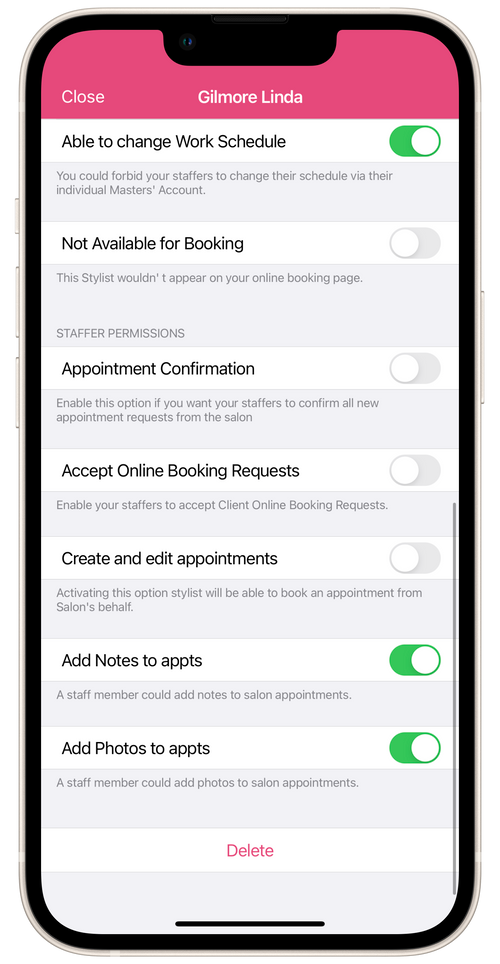
Permissions:
Section titled “Permissions:”Able to change Work Schedule
Section titled “Able to change Work Schedule”You can allow or forbid staffers to change their schedules at the salon through their personal accounts in Masters Pro.
Not Available for Booking
Section titled “Not Available for Booking”The staffer will not be displayed in the Calendar section of the salon app.
Hide for online booking
Section titled “Hide for online booking”When this option is turned on, the staffer will not be displayed on the salon’s online booking page and clients will not be able to book an appointment. You can only create an appointment for the staffer manually or the staffer can create the appointment themselves in the personal Masters Pro app.
Appointment Confirmation
Section titled “Appointment Confirmation”When this option is turned on, the staffer will have to confirm their new salon appointments in the Masters Pro personal app.
Accept Online Booking Requests
Section titled “Accept Online Booking Requests”When this option is turned on, the staffer will be able to confirm new online booking requests from clients for the salon on their own Masters Pro app.
Create and Edit Appointments
Section titled “Create and Edit Appointments”Turn on this option and the staffer will be able to book clients for salon services themselves through their own Masters Pro app. The staffer will not have access to client contacts, and appointment messages will be sent to the client through the Masters Salon app. It will only be possible for this staffer to create new appointments by repeating the client’s previous appointments with this staffer.
Add Notes to Appointments
Section titled “Add Notes to Appointments”When this option is turned on, the staffer can add and modify notes in the salon’s appointments in their own Masters Pro app.
Add Photos to Appointments
Section titled “Add Photos to Appointments”When this option is turned on, the staffer will be able to add and modify photos in the salon’s appointments in their own Masters Pro app.