

Performance
The performance widget displays:
- average check in the salon;
- wage per hour;
- the total number of work hours of all staffers in the salon;
- number of staffers’ hours worked;
- the utilisation rate of all staffers in total for the current month.
💡 To view the report, you can select the display Salon + Staffers, Salon (the name of your salon) or Staffer (the name of the staffer) at the top.
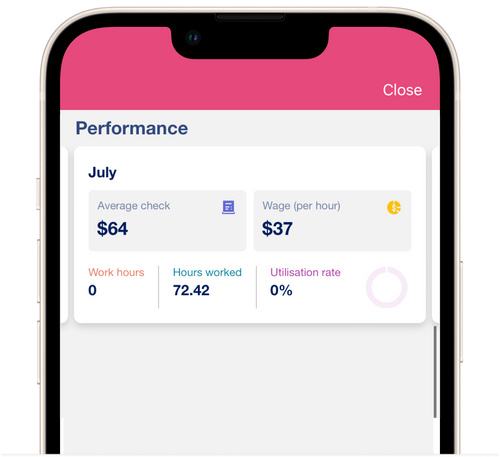
Average check
Section titled “Average check”The average check is calculated as the actual sales for the month divided by the number of appts in that month.
Wage (per hour)
Section titled “Wage (per hour)”The cost of an hour depends on the number of appts per month and is counted as actual sales divided by the number of hours worked.
Work hours
Section titled “Work hours”It consists of the settings of business hours and days off. The number of working hours for the entire current month for all employees is always displayed. To view the number of working hours for a specific employee, select the desired employee at the top of the reporting section.
Hours worked
Section titled “Hours worked”This is the number of hours spent on client appointments, according to your calendar for the entire current month.
Utilisation rate
Section titled “Utilisation rate”The utilisation rate for the entire current month is calculated from the ratio of the number of hours worked to the number of working hours.