

Appointments
The widget displays the total number of appointments for the current month, as well as the number of actual, projected and canceled appointments. Total number of appointments per month = past appts. + future appts. Cancelled appointments are not added.
⏵ Important: to correctly calculate the percentage of appointments for the month, the total number of appointments, including canceled appointments, is used.
Clicking on the Report button opens a detailed section of appointments. There are three reports in this section: Summary, Booking Type and Cancellation. To view a detailed report on bookings for each month, click on the name of the month. In each report of the section, graphs of the ratio of the total number of appointments to the month/year are generated.
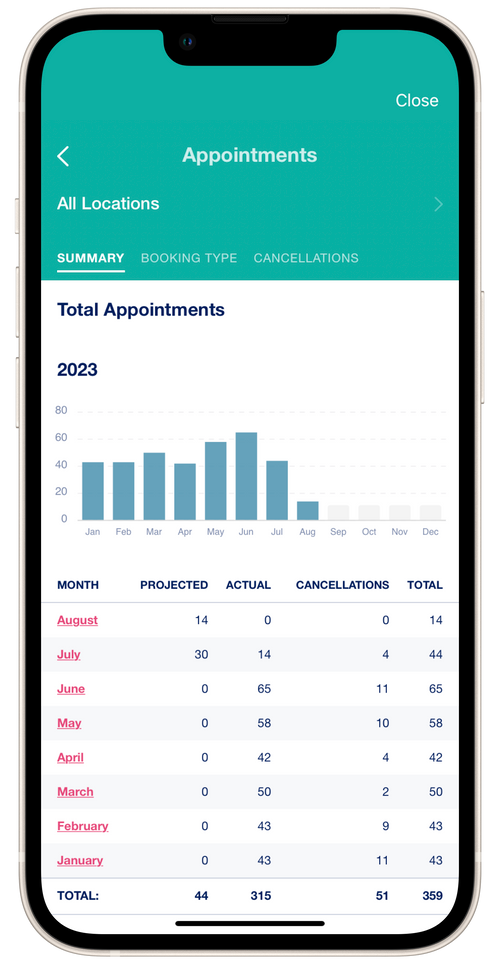
Summary
The summary report shows the total number of bookings for each month. The table shows the number of projected, factual and cancelled bookings.
💡 Cancelled bookings are not taken into account in the detailed reports when calculating the total number of appointments for the month/week.
Booking type
The report shows the total number of appointments divided into manually created by a professional and created by clients.
Cancellations
The report shows the number of canceled appointments by initiator: professional or client.
💡 If you are an invited employee to the salon, then the Booking type and Cancellations reports will additionally display the booking type or the initiator of cancellations Salon.