

Clients
The widget shows the total number of clients in the app. All clients are divided into four categories: new, regulars, inactive and blacklist. The widget doesn’t scroll by month, it always displays the total number of clients at the moment.
💡 The light-gray color on the chart shows those clients from the app who haven’t had appointments yet. Therefore, the total number of clients from all four categories may be less than their total number in the Clients section in the app.
Click on the Report button to open a detailed sales section for clients. There are four reports in the section: Sales, New, Inactive, Blacklist. In each report of the section, you can switch the display of data by year and month.
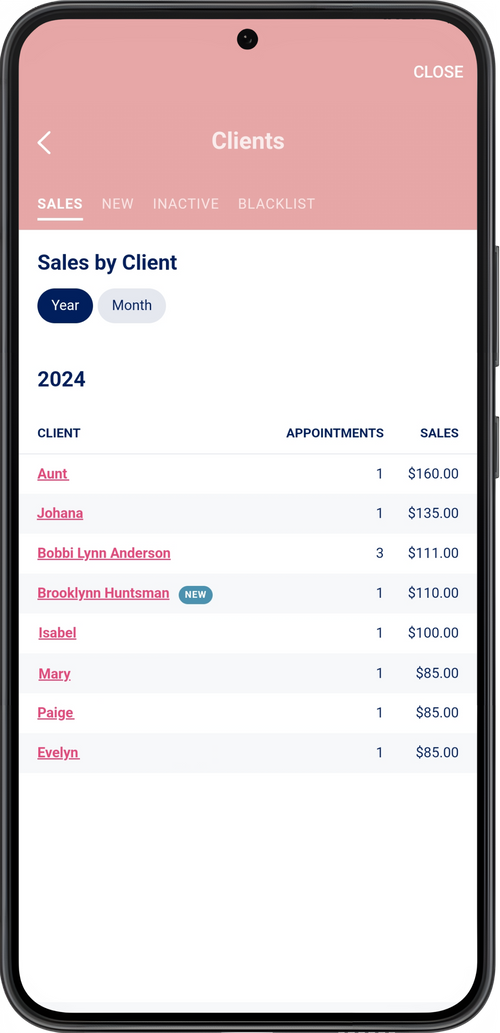
The report shows all the clients who have been booked to you for services. The list is sorted by sales: from the client who brought you the biggest sales to the client with the lowest sales.
💡 For some categories of clients, additional designations have been introduced in the list:
- deleted clients – status Deleted
- new clients – status New (displayed for those clients who had only one appointment)
- blocked – lock icon
New, Inactive and Blocked
Section titled “New, Inactive and Blocked”The New, Inactive and Blacklist reports display the dates of the last appointments of these clients and total sales. Click on the client’s name to open a detailed report on him: the last income for 30 days and a list of all his appointments for the selected period.
💡 Blocked clients are not displayed in the New and Inactive reports. In addition to the Blacklist report, these clients are also displayed in all general sales reports.